AI Christmas Elf: A Ten-Second Breakdown
 RemakeReel Team
- Trends
- Weihnachten
Frame by frame: how the AI christmas elf clip turns one photo into a costume change in ten seconds, and which moments your photo has to survive.
Ten seconds is not long, but this clip uses them in three distinct phases, and each phase asks something different of the photo you upload.
Read the breakdown before you choose a picture. It will tell you which frame to check first when the result arrives.
0:00 – 0:02 — the ordinary frame
A person stands in a living room beside a lit tree, in a grey jumper and jeans, doing very little. Then a column of warm sparkles starts at the head and runs down to the floor.
This is the most demanding part of the clip for your photo, and the least forgiving. The framing is the widest of the three phases, the face is evenly lit, and the camera is still. Anything soft about the source photo lands here.
If the first two seconds look like you, the rest usually does.
0:02 – 0:05 — the change
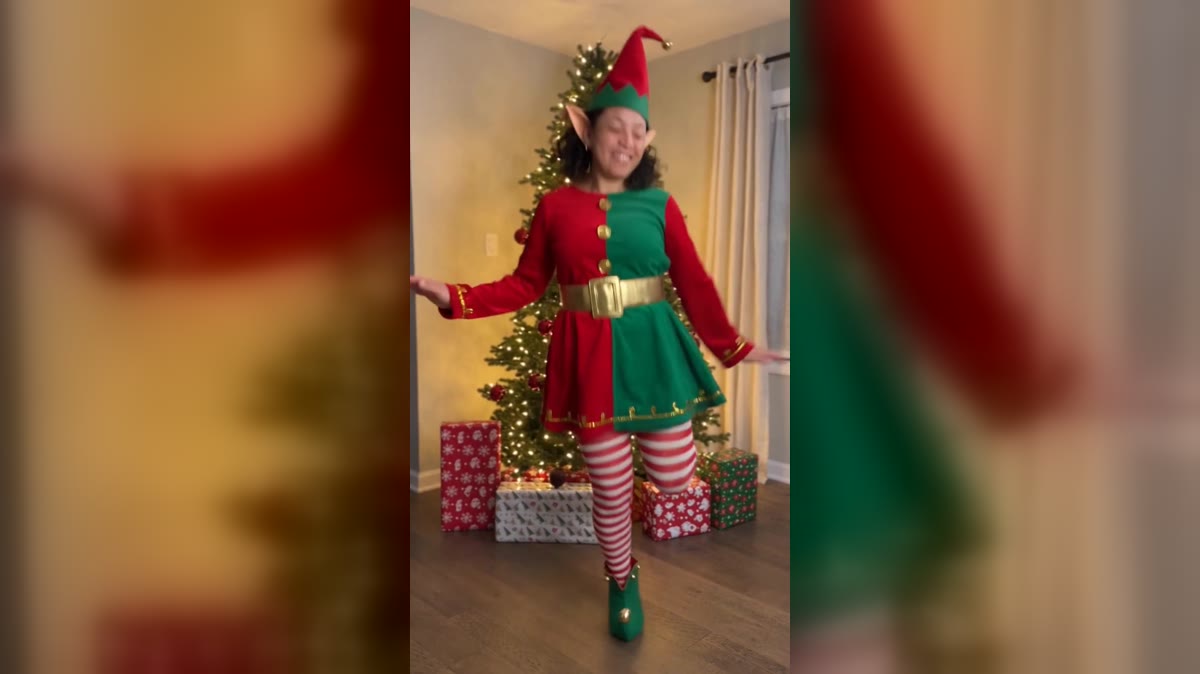
The sparkles pass over the body and the clothes are replaced: a red and green elf dress with a gold buckle, striped tights, curled green shoes. The ears change shape. A pointed hat appears.
Nothing about this needs to come from your photo. The costume, the shape of the hat, the exact shade of green — all of it is in the reference. What your photo has to survive is the continuity: the same face before and after the flash.
This is where a mismatched photo shows up as a slight jump, a face that is a fraction wider after the change than before it.
0:05 – 0:10 — the dance
The last five seconds are the performance: arms out, a spin, a smile straight down the lens. By this point the elf is entirely in costume and the room is unchanged.
The final frames are the ones people screenshot, so check them last but check them properly. Motion blur is real here, and a face that is slightly off in the dance is more visible in a still than in playback.
Why the grey jumper matters
People assume the grey jumper is what gets replaced. It is the opposite: the jumper stays, and your photo has to carry the person wearing it.
That is the whole trick of the clip. It is not a costume swap on a finished video; it is one continuous person who happens to get dressed by magic two seconds in. If you upload a photo where the face is angled away, the first two seconds — the ones before the distraction of the costume — are where the audience notices.
Photo rules that follow from the timeline
The three phases dictate three requirements.
- Frontal, evenly lit. The opening frame is a straight-on shot, so the photo should be straight-on too.
- Head and shoulders, sharp. The change compresses the face; a soft photo becomes softer.
- Colour temperature indoors. The room is warm, lamp-lit, with a wooden floor. A cold outdoor photo reads as a cut-out in phase one.
One more thing worth knowing: the clip is silent-to-camera before the dance, so a neutral expression in your photo is not a problem. The smile comes from the reference, not from you.
Troubleshooting
The face changes between 0:02 and 0:03. The photo is probably angled. Retake with the head level and the eyes on the lens.
The first two seconds look like a different person. Soft source photo, or an old photo taken with a different phone and a different colour profile. Use the newest one you have.
The dance looks fine but the stills are blurry. That is the source clip, not the photo. The last five seconds move quickly and a paused frame catches it.
The elf ears look odd. They are added by the reference and sit differently depending on the shape of the head in your photo. A smaller crop around the face generally sits better than a wide shot.
Where it belongs
This is the shortest of the Christmas transformations at ten seconds, and the only one where a single photo produces a costume change rather than a scene. It is a good first attempt if you have never used a template before: one upload, ten seconds, the cheapest of the long Christmas clips.
If you want three people in costume rather than one, the three-photo elf dance is the group version. If you want the transformation to be someone else's problem — specifically Santa's — Dance With Santa is fifteen seconds of dancing.
The template: AI Christmas Elf.
Questions we keep getting
What is the AI christmas elf video?
A ten-second vertical clip where one person stands beside a lit tree and is transformed by a burst of sparkles into a red and green elf: pointed hat, elf ears, gold belt, striped tights and curled shoes. Then the elf dances to camera.
How many photos does it need?
One. It replaces the person for the whole clip, including the frames before the costume change, so the jumper and jeans at the start are also your face.
Does the costume change come from my photo?
No. The grey jumper, the sparkles and the elf costume all come from the reference. Your photo supplies the face, hair and skin tone, and keeps them consistent through the transformation.
Why does my clip look wrong in the first two seconds?
The opening is the widest, most evenly lit framing, so a soft or distant photo shows there first. If the first two seconds are solid, the rest of the clip usually holds.
Does it have sound?
Yes, the reference audio is included. The clip is designed as a ten-second loop, so the track is a short cut rather than a full song.
One photo, one transformation
Check the first two seconds when the clip arrives. That is where the photo is doing its work.
Open the AI Christmas Elf template