King Jin AI Trend: Make It With Your Photo
 RemakeReel Team
- Trends
- How-to
Learn what the King Jin AI trend is, explore its four scenes, and see how to recreate the video with your photo, plus tips for keeping your face and outfit.
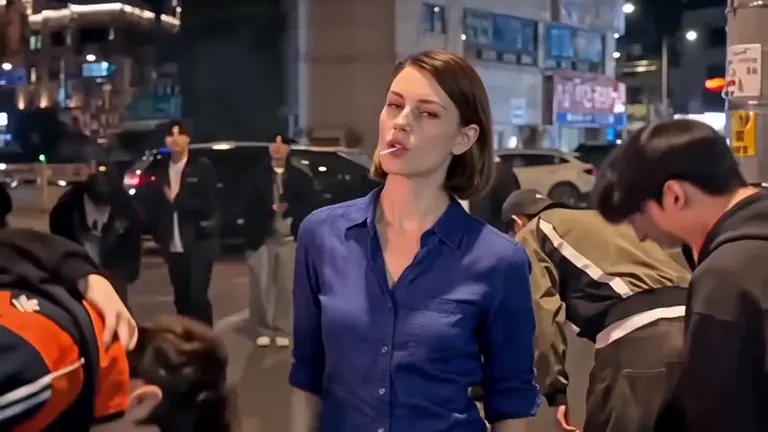
The easiest way to recognize a King Jin video is to watch the people around the lead. They bow while the person in the middle stays upright, with a lollipop at their mouth. A few cuts later, the same person is in a blue hallway, then on a rooftop.
If you want to make the King Jin AI trend with your own photo, this guide shows the version available in RemakeReel. There is a reference clip to watch first, followed by the upload steps and an actual generated video beside the photo used to make it.
What is the King Jin AI trend?
The TikTok posts we found use “King Jin” for this photo-based entrance effect. Different people take the lead in each version of the same short sequence. Our reference runs about ten seconds.
On November 15, 2026, @xdwshfzqi0k's tutorial showed about 3 million plays, and @i0159157's tutorial showed about 1.3 million. Both explain how to make a version from one photo in CapCut. These counts belong to those two posts; they are not a total for the trend.
Template reference ·
@tramthoigian_01 on TikTok
. This is the reference used for our template; we have not verified the trend's first creator.
What to look for in the four scenes
The street. There are parked cars and lit shop signs behind the lead, but most of the movement comes from the people bowing on either side. The person in the middle barely needs to move to become the center of attention.
The close-up. The camera cuts closer as the lead brings a hand to the lollipop. The crowd drops into the background, leaving the face and that small gesture to hold the shot.
The hallway. Blue-green walls, glass doors and a staircase give this cut a different feel from the street. The wider view also shows more of the outfit, which is why the clothes in your input photo matter.
The rooftop. The final cut brings the face into daylight, with a city skyline behind it. The setting and lighting change considerably, but the person should still be recognizable from the opening.
How to make a King Jin AI video with your photo
1. Open the King Jin template
Open the King Jin AI video generator. Watch the reference and at least one generated example before choosing a photo. The examples are labeled separately from the reference, so you can see the difference between the scene being recreated and an actual output.
2. Choose one clear photo
Use a well-lit photo of one adult facing the camera. A waist-up or full-body picture is useful because it shows both the face and the clothes. An ordinary background is fine, and there is no need to hold a lollipop in the photo. Those details come from the reference.
3. Select quality and check the cost
Choose Standard 720p or HD 1080p, then check the displayed one-video price or subscription-credit cost. Sign in if prompted and complete the consent step. Use your own photo, or one you have permission to use. RemakeReel supplies the prompt, so the page does not ask you to describe the four scenes yourself.
4. Generate, then review the whole clip
Start generation and follow the task in My videos. When it is ready, play it through before downloading. Check the mouth and hand in the close-up, the outfit in the hallway and the face after the final cut. Small gestures and timing can differ from the reference.
A real result: compare the face and outfit
The photo below shows a fictional adult with short brown hair and a blue button-up shirt. Compare it with the reference's long-haired lead in a patterned top. In the generated clip, the blue shirt and short hair remain recognizable on the street and in the hallway.
The close-up is worth pausing. It gives you a better view of the face than the opening wide shot, and makes small differences easier to spot.
Input photo

Actual AI-generated result · 16:9 test
This approximately 11-second clip is a 16:9 landscape test.
The surrounding crowd stays in supporting roles; your photo replaces the lead. You can watch the other King Jin examples to compare different faces and outfits.
Photo tips for a more consistent King Jin video
Start with the photo where your face is clearest, even if it is less dramatic than your favorite selfie. Sunglasses, deep shadows and strong beauty filters obscure details that become obvious in the close-up.
If you want a particular outfit in the video, include it in the photo. A tight headshot gives the model very little information about what you are wearing. Simple clothes are also easier to compare afterward; a small logo or intricate pattern may change during generation.
Keep only one person in the upload. King Jin has one lead role, and the scene already supplies the crowd. A group picture makes the intended subject less clear.
Questions before you make yours
Do I need CapCut?
No. The linked TikTok tutorials use CapCut, but the steps in this article use RemakeReel in your browser. You do not need a CapCut template link for this version.
Will the video keep my face and clothes exactly?
That is what the photo guides, but exact preservation is not guaranteed. Facial details, clothing patterns and gestures can change. Use the examples to judge whether the results suit what you have in mind, and review your own clip before posting it.
Is the output vertical or landscape?
The template creates 16:9 landscape video at 1280 × 720 in Standard or 1920 × 1080 in HD. The generated test above is also 16:9. The TikTok reference preview is shown in 4:3.
What song do the tutorials use?
Both linked tutorials list “KIAT JUD DAY HARDTEKK (TikTok Version)” by hardangel in their TikTok sound metadata. Other versions may use different audio. RemakeReel does not guarantee the original track, so listen to the export before posting.
How long does generation take?
There is no fixed completion time. You can leave the page and check the task in My videos. If it is still being confirmed, check that task before paying for another attempt. The credits and refunds guide explains how failed tasks are handled.